
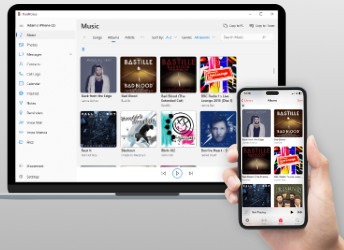
Manage and Transfer iPhone
and iPod Music
- Copy Songs to Your PC or Mac
- Smart Transfer to iTunes or
the Music app - Preserve Song Data –
Artwork, Ratings, Play Counts - Backup Playlists, Podcasts,
Videos, Ringtones & More - Play iPhone Music via Your Computer


Compatible with Windows 11 and Windows 10
All models of iPhone, iPod and iPad supported including iPhone 18 and iOS 27 devices
All models of iPhone, iPod and iPad supported including iPhone 18 and iOS 27 devices
◄ Features ►

Transfer Music to your computer
Copy songs from your iPhone, iPod or iPad to your computer with ease. TouchCopy will find any music on your device missing from your iTunes or Mac Music app library and fill in the gaps in a few simple clicks.
Take back control of your music by copying it to a folder on your computer, or into iTunes or the Mac Music app!
Copy all types of audio media
When copying your music library with TouchCopy, don't leave your other audio files behind! You can also access...


What is included with music in TouchCopy?
Play iPhone music on your computer
Listen to your iPhone, iPod or iPad music library directly through TouchCopy. Just hook up your device to your computer and access all your tracks, albums, playlists and more. Turn up your speakers and enjoy!

