
Messages Export Pro

Export SMS and iMessages from the Mac Messages App
Save your conversations as PDF, CSV or TXT.
Everything stays private on your Mac.

For macOS 14.6 or later. Compatible with macOS 26.
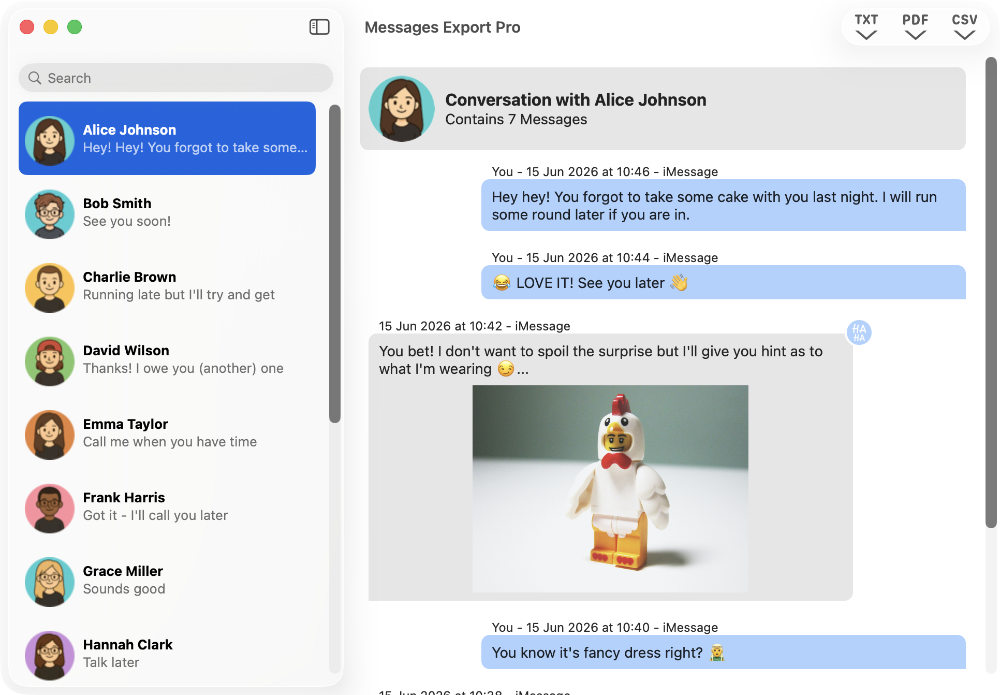
Access Messages Instantly
Automatically loads SMS, MMS, RCS and iMessages from your Mac. No iPhone connection or backup required.
Wide Range of Export Formats
Save messages as PDF, CSV or TXT - reliably producing professional and accurate documentation.
Save Message Attachments
Include images in PDF exports, or save photos, videos, audio and other attachments separately.
Useful Export Formats for Every Occasion:
Beautifully formatted files showing your messages in the familiar chat-bubble format, with images neatly embedded.
Perfect for:
- sharing
- printing
- archiving
CSV
Spreadsheet-friendly files containing all important message information, neatly organized into columns and rows.
Perfect for:
- analysis
- reporting
- legal evidence
TXT
Lightweight, readable plain text files containing messages and metadata, but no images or formatting.
Perfect for:
- space-saving backups
Ready to Export Your Messages?
Start for free, then upgrade once to unlock every export format.
| TXT | CSV | Attachments | ||
|---|---|---|---|---|
| Free | ✔︎ | ✖︎ | ✖︎ | ✔︎ |
| Professional | ✔︎ | ✔︎ | ✔︎ | ✔︎ |
Check out our step-by-step guide, and you'll be saving your Mac messages and attachments in minutes.
Getting started with Messages Export Pro →