
TouchCopy does not show all my music or video
If TouchCopy isn’t displaying some of your music in a playlist or the main music library, ensure you’re using the latest version of the software. To check for updates, go to Settings (PC) or Preferences (Mac) and select Updates.
For details on the latest TouchCopy updates and to download the newest version, visit:
Update TouchCopy for PC Update TouchCopy for MacOn the Music tab, you can sort your music by clicking the header of any column (e.g., Song, Album, Artist).
To quickly find specific tracks, use the search box in the top-right corner of TouchCopy. The search checks for matches in Song, Album, and Artist names.
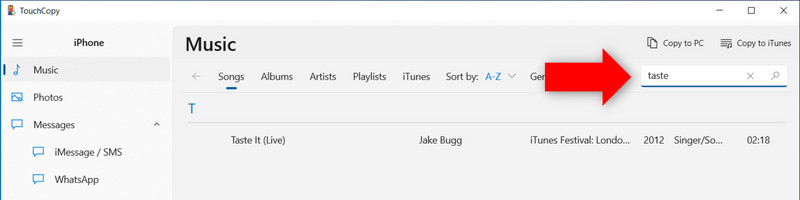
Please search for your tracks to see if TouchCopy can see them in the list of songs shown in the TouchCopy preview.
If some tracks are missing from the list, or if tracks are marked with a cloud  icon, this means that the track is stored in iCloud, rather than on the device itself. TouchCopy will only be able to play and copy songs that are stored locally on your device. You must first download these tracks to your device before TouchCopy can play or copy them.
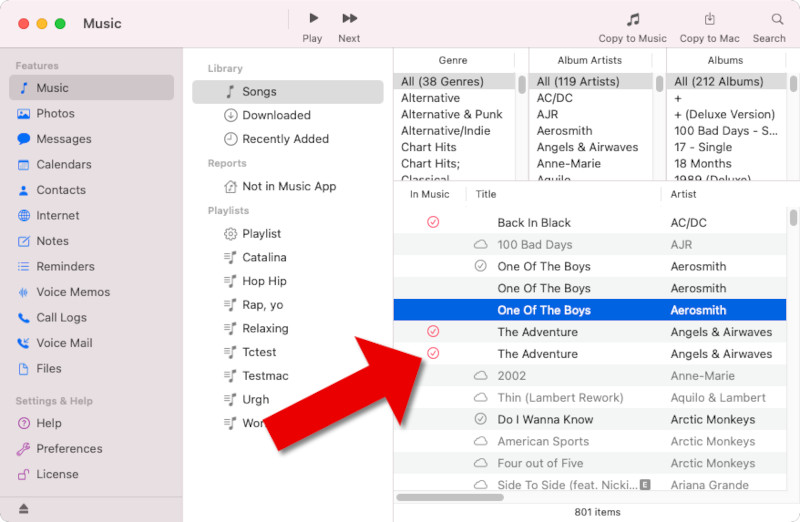
Check out our guide for steps on how to download iCloud music to your iPhone.
For more help with how to copy music from your iPod or iOS device to your computer, check out our user guide.


Popular FAQs
- How do I get rid of the exclamation mark next to the songs I copied to iTunes?
- How to merge different iTunes libraries?
- How to Transfer Music from iPod to USB Stick / Flash Drive
- How to create a second iTunes library on the same computer
- How to merge content of multiple iPods in a single iTunes library?
- How to find music on iPhone currently not in iTunes
- Does TouchCopy prevent iTunes auto-syncing my iPod?
- How to sync songs from iTunes to iPod without erasing songs already there
- How to Move iTunes Library to New Computer
- How do I restore my music library from a backup made by TouchCopy?
- How to authorize a computer on iTunes