
I have forgotten my software license password
Last Updated: |
Summary
Some of our software requires a password during activation. If you've forgotten yours, it can usually be recovered quickly and automatically.
When you first activated your software, you were asked to create a password and provide an email address. This email address is used to send your password to you if you ever forget it. You can request your password directly from within the program during the activation process. If you don't see the email, please check your spam or junk folder.
Newer programs like "Droid Transfer 2" and the latest version of "TouchCopy" do not require an activation password.
To recover your activation password, follow these steps...
- Install your purchased software on your computer, and launch it.
- Click "Activate" and enter your activation code.
- Underneath where the software asks for your current password, you'll see an option to have your password emailed to you.
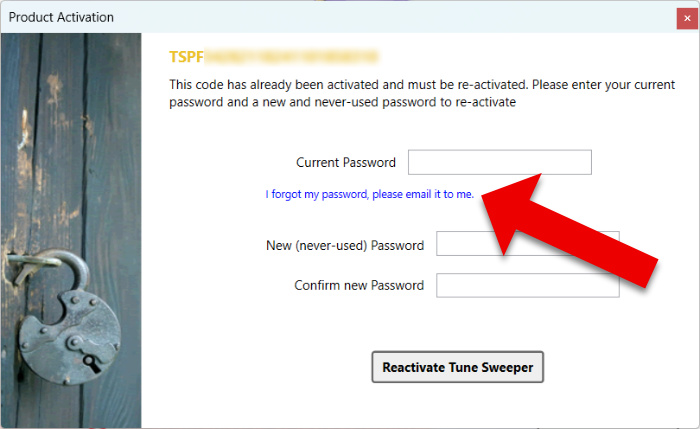
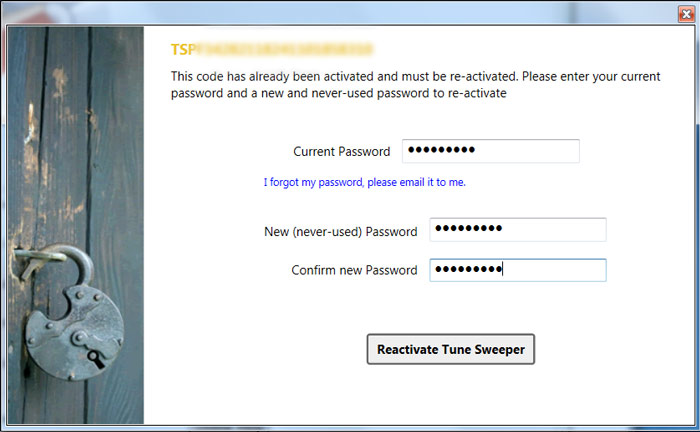
- When you receive the email, enter the old password you received into the software. Please remember that passwords are case-sensitive.
- Choose a brand new, never previously used password which is less than 16 characters long.
- Click Activate / Reactivate.
Further Information
- Follow the steps in our guide if your software activation fails with an error.
- Bought a new PC or Mac? Find out how to transfer your license to your new computer.
- If you're having issues with a TouchCopy activation code, please see our support article providing more information on TouchCopy activation.
- If you have lost your activation code, or you did not receive one after your purchase, find out how to retrieve your code.
- Find out if you need a new activation code after switching email address.
- Switching platform? Check out our guide on multiple licenses and platform-specific licenses.
< Back to Licensing & Installation Support
 Publisher:
Wide Angle Software
Publisher:
Wide Angle Software
Popular FAQs
- How to find your activation code after making a purchase
- How to Activate Droid Transfer
- How to Activate TouchCopy
- How to Activate Tune Sweeper
- How to Activate iBackup Extractor
- How to Activate Music Tag
- How to Activate Duplicate Sweeper
- How to Activate Wide Angle PDF Converter
- How to Activate Contact Transfer
- How to Deactivate TouchCopy, iBackup Extractor or Droid Transfer