
Will iBackup Extractor read the contents of a backup made to iCloud?
Last Updated: |
iBackup Extractor will read the contents of backups made to your local computer only. As such, the software cannot read backups of your device made to iCloud.
If your backups are set to be stored in iCloud, you can change this in your iTunes settings (or in Finder on macOS Catalina or higher).
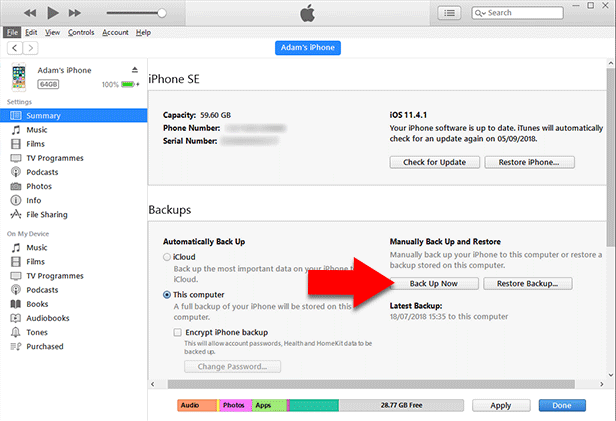
To create a local backup of your device to your Windows PC or Mac running earlier than macOS Catalina:
- Open iTunes on your computer.
- Connect your iPhone / iPod Touch / iPad.
- Click your device icon.
- Ensure you are viewing the Summary tab.
- Under Backups, make sure "This computer" is selected, then hit "Back up Now".
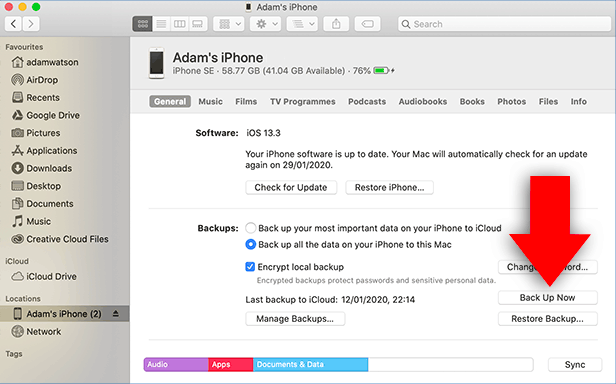
To create a local backup of your device to your Mac running macOS Catalina or higher:
- Open Finder on your Mac or MacBook.
- Connect your iPhone / iPod Touch / iPad.
- Select your device.
- Ensure "Back up all the data on your iPhone to this Mac" is selected.
- Click 'Back Up Now'.
Now you can launch iBackup Extractor which will find any backup which you have created on your computer!


< Back to iBackup Extractor Support
 Publisher:
Wide Angle Software
Publisher:
Wide Angle Software
Popular FAQs
- How to Activate iBackup Extractor
- My iBackup Extractor activation code does not work
- Where are iPhone Backups Stored on Windows and Mac Computers
- How to Create Backup of your iOS Device
- Forgot Your iPhone Backup Password? Here's How to Reset It
- How to Remove Encryption from iPhone, iPad or iPod Touch Backups
- Does iBackup Extractor Read Encrypted Backups?
- How to View and Access iPhone Backup Files
- Can I Recover Data from a Lost iPhone?
- How to Retrieve WhatsApp Messages from iPhone Backup
- How to Give iBackup Extractor Access to iPhone Backups on Mac
- How to View and Recover Deleted Call History on iPhone
- Can iBackup Extractor Retrieve Voicemails from my iPhone Backup?
- How to Retrieve Deleted Contacts on iPhone
- How to Deactivate Your Software License Before Transferring to a New Computer
- iBackup Extractor vs. TouchCopy