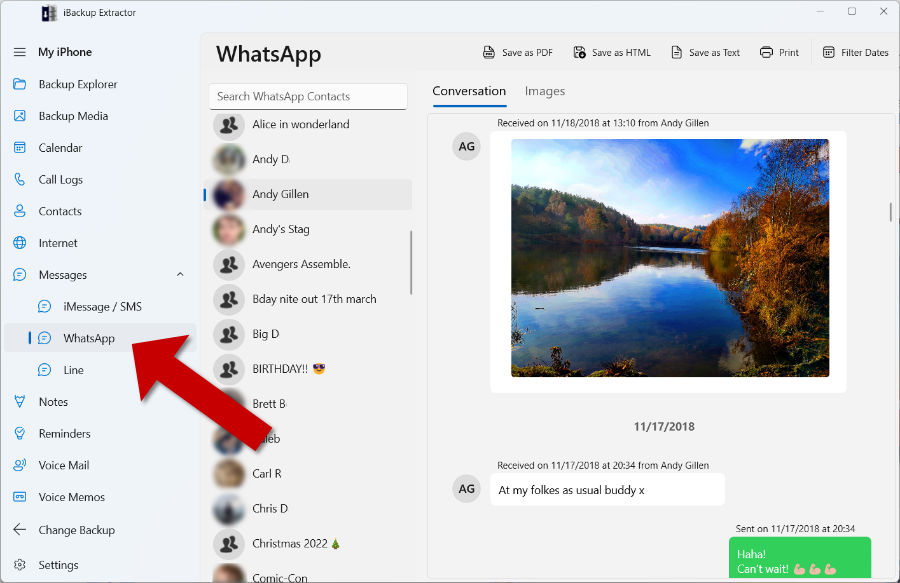
Even if WhatsApp itself doesn't have a backup, your messages may still be available inside an iPhone backup on your PC or Mac. With iBackup Extractor, you can easily view, select and export the exact chats you need to your computer, without needing to restore the backup to your device and risking data loss.
Lost other types of messages too? iBackup Extractor can recover SMS, MMS, iMessage and WhatsApp messages from a backup of your iPhone.
How to retrieve WhatsApp messages from an iPhone backup using iBackup Extractor
- Download and install iBackup Extractor on your PC or Mac, then launch the application.
- Select the iPhone backup you want to explore.
- If your backup is encrypted, enter the password when prompted.
- Click "WhatsApp" under "Messages" in the navigation menu.
- Select a contact to view your WhatsApp conversation with them.
- Choose an export format (HTML, PDF, CSV or Plain Text), then select where to save the file on your computer.
What WhatsApp data can I access with iBackup Extractor?
The app allows you to recover a wide range of WhatsApp data from your iPhone backup, including:
- All WhatsApp messages and chats
- Media files shared via WhatsApp (images, videos, documents, audio messages, etc.)
- Contact information (names, phone numbers, profile pictures)
- Group chats and their details
- WhatsApp Business chats
- WhatsApp call history
Why Choose iBackup Extractor?
Selective Data Recovery vs. Full Device Restore
iPhone and WhatsApp backups can't normally be browsed or previewed before restoring them, so restoring a backup can be a risk — especially if it replaces newer data on your device. iBackup Extractor removes that uncertainty by letting you explore all WhatsApp chats and messages in your backup before choosing what to export.
Without iBackup Extractor, you would need to:
Either option means overwriting what's currently on your device, which could result in loss of recent data. So, if you'd prefer more control and selectively choose what data to retrieve, iBackup Extractor is perfect for you.
Control and Flexibility
- Export your WhatsApp messages in a choice of popular formats (PDF, HTML, CSV or Plain Text).
- Filter messages by date to export or print only messages sent and received in your specified range.
- Print your WhatsApp messages directly from the application.
- Customize your export and print settings to suit your needs.
- Access lots of other file types from your backup, including photos, videos, contacts, calendars and call logs.
Frequently asked questions
Can I retrieve deleted WhatsApp messages from an iPhone backup?
Yes, if the messages were included in the backup, you can view and export them using iBackup Extractor.
Can I view WhatsApp messages without restoring my iPhone?
Yes, iBackup Extractor allows you to open your backup and view messages without restoring your device.
Does restoring an iPhone backup delete current data?
Yes, restoring a backup replaces your current data on your iPhone. iBackup Extractor avoids this by allowing selective recovery.
What backups can I access with iBackup Extractor?
iBackup Extractor can access local backups created using iTunes, Apple Devices and Finder.
Can you recover WhatsApp messages without a backup?
In most cases, WhatsApp messages can only be recovered if a backup exists. iPhones store app data securely, which makes recovery without a backup difficult.
If you have an iPhone backup, iBackup Extractor allows you to retrieve WhatsApp messages without restoring your device or losing your current data.