
Which Audio Formats are supported by Music Tag?
Summary
Music Tag supports a variety of different audio formats, allowing you to edit the tags of all of the popular formats using the software.
Supported audio formats:
- ID3 Tag in MP3 audio files
- MPEG-4 (MP4, AAC, iTunes)
- Windows Media Audio (WMA)
- Free Lossless Audio Codec (FLAC)

Music Tag Overview
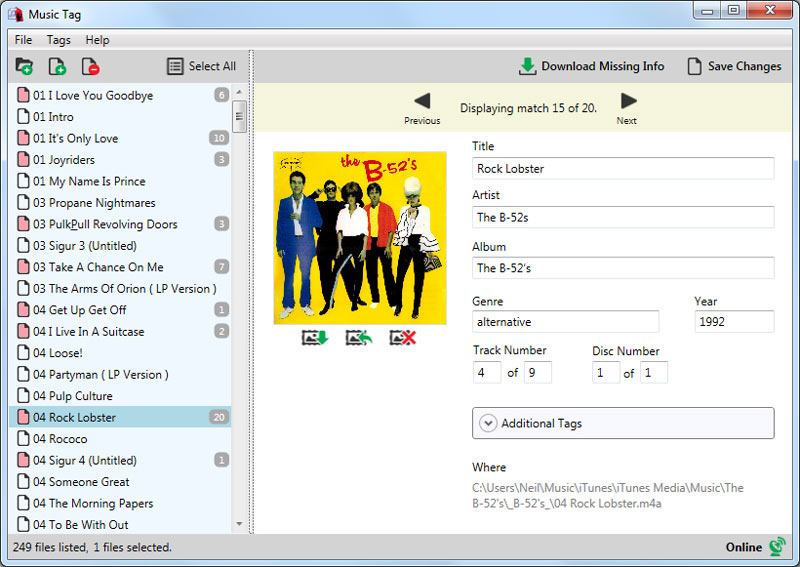
Music Tag analyzes your music library and downloads missing artwork and track data directly to edit your music files. It also allows you to manually edit tags on your tracks such as Title, Artist and Album - you can even create new tags and save them to your tracks!
We are constantly looking for ways to improve and add new features to the software, so please contact us to suggest new features and request support of other audio formats.
Next Steps
Why not give Music Tag a try? Download the free Music Tag trial to access the full feature set, and be able to save edited track information to one track per run of the software.
Purchase Music Tag for full unrestricted access, and save your edits to any number of tracks all at once.

Popular FAQs
- How to Install or Remove Music Tag from your PC
- How to Activate Music Tag
- I have Forgotten my License Password
- How can I Download Missing Tags using Music Tag?
- How do I Download Missing Artwork using Music Tag?
- How to Edit MP3 Tags with Music Tag
- Edit FLAC Music File Tags with Music Tag
- How do I use Music Tag with iTunes Files?
- How to Get Album Artwork on iTunes
- Music Tag is not Connecting to the Internet - Troubleshooting
- What are the Free Trial Limitations of Music Tag?