Understanding TouchCopy's Music Copy History & Reports
How to use TouchCopy's Copy History
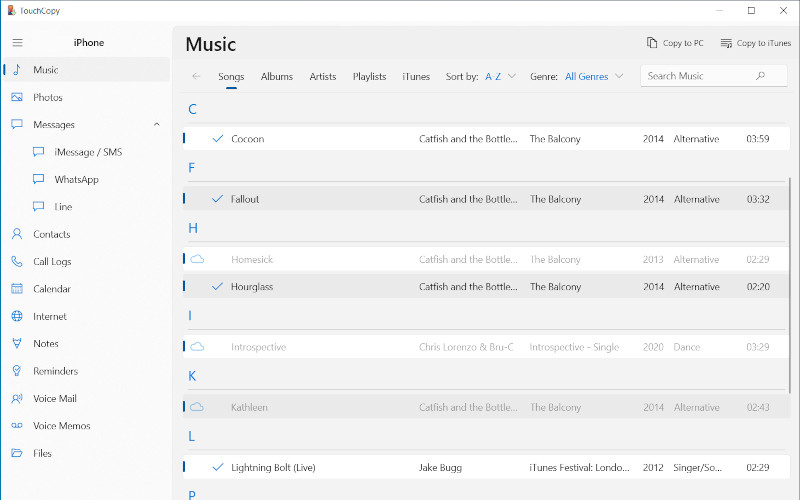
As a track is successfully copied, TouchCopy will mark the track as copied with a tick icon next to the selected track. This allows you to know which tracks have been copied and which have not.
On Windows, TouchCopy will mark tracks it has copied successfully with a blue tick .
On a Mac, a red tick under "iTunes/In Music" indicates that the track has been copied to your iTunes/Music app library; and a black tick next to a track indicates that you have copied the track to your computer hard drive, rather than directly to your library.
Tracks marked with a cloud icon are songs which are stored in an iCloud library rather than locally downloaded to your connected device itself. In order to copy such tracks, you'll need to download them from iCloud to your device first - then TouchCopy can access and copy them from device to computer for you.
The "Not in iTunes" and "Not in Music App" Report
If you use iTunes or the Mac Music app to manage your music library on your computer, this feature could be just what you need.
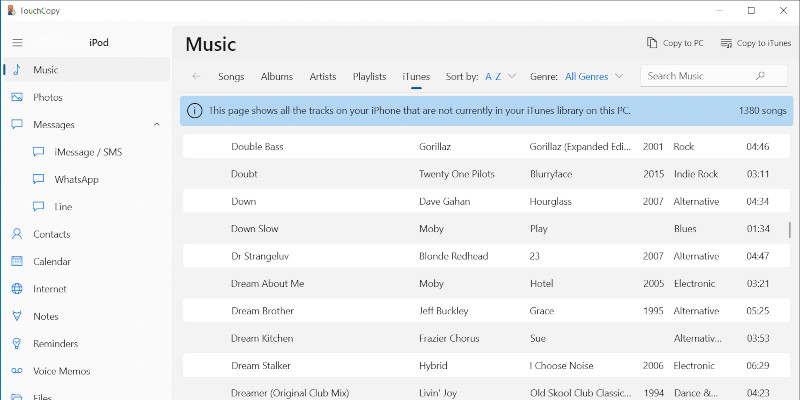
On PC, click the "iTunes" header in the Music section of TouchCopy.
On Mac, click the "Not in Music App" header under "Reports" in TouchCopy's Music section.
Here you'll see a full list of music which is stored on your connected device (iPhone, iPod or iPad), but which is not yet part of your iTunes/Music library on your computer.
So, if you want to ensure that your music library on your computer contains all your music from all your devices, copy all the music from this report to iTunes/Music!
Once the tracks have been copied to your library, they will disappear from this report.
Troubleshooting Music Copy Issues
As each track is transferred into iTunes a tick will appear next to each track that was successfully copied.
We use cookies to provide you the best experience on our website. To find out more, read our cookie policy. You may decline non-essential cookies if you prefer.
We use cookies to track usage and optimize your experience.

 .
. icon are songs which are stored in an iCloud library rather than locally downloaded to your connected device itself. In order to copy such tracks, you'll need to download them from iCloud to your device first - then TouchCopy can access and copy them from device to computer for you.