If you’ve created playlists on your iPhone, iPod, or iPad, you can easily copy them to iTunes or the Apple Music app on your Windows or Mac computer.
While newer versions of iTunes no longer let you export playlists directly, TouchCopy provides a simple way to transfer your music and playlists to your computer.
If you have not done so already, you can download TouchCopy from here:
TouchCopy enables you to easily transfer all your songs and playlists from your device to your music library on your computer.
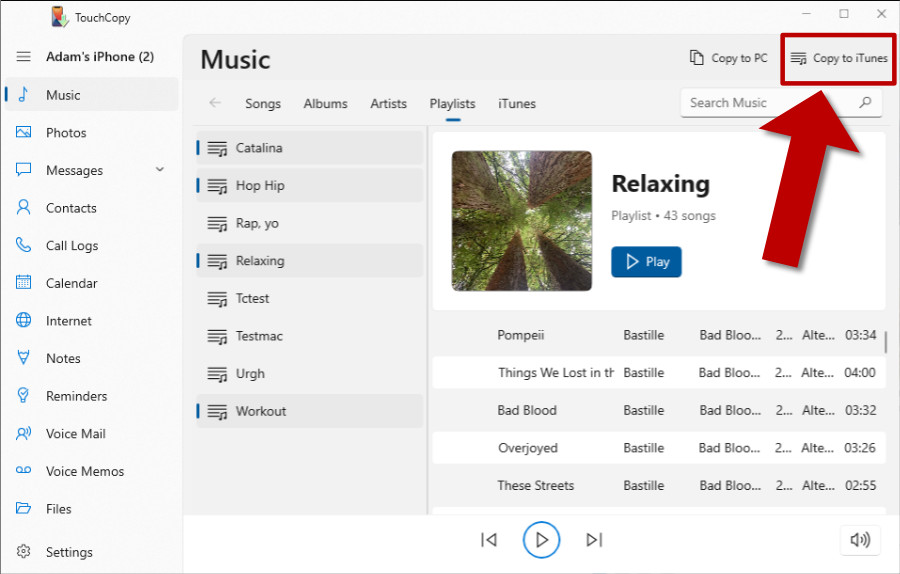
To transfer songs from your iPod or iOS device into iTunes click on the Music tab in TouchCopy and then click on the "Copy to iTunes" button. If you use the Apple Music app on Windows, or the Music app on macOS Catalina or higher, click "Copy to Music" instead. TouchCopy will then start copying your selected music and playlists to your music library on your Mac or PC.
You can select individual songs or groups of songs you wish to copy by Shift-Clicking tracks in TouchCopy.
Follow the steps below to copy playlists from your iPhone/iPod/iPad to Apple Music on Windows:
Alternatively, TouchCopy can compare your device and iTunes content, so you can quickly populate your library with missing songs from your device.
If your tracks are stored in iCloud, rather than locally on your device, TouchCopy will not be able to copy them. These tracks will be marked with a cloud icon in TouchCopy. Find out how to download iCloud music to your device to ensure that TouchCopy can access and copy it for you.
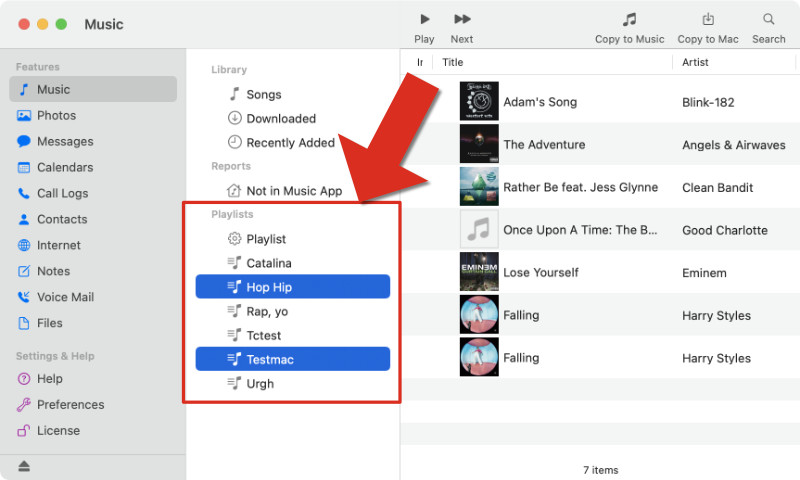
To copy your iPhone and iPod playlists into iTunes, select the Playlists you wish to copy from the source list in TouchCopy. If using the latest version of TouchCopy for PC, select the Playlists tab in the Music section to access your playlists.
You can select multiple playlists by CTRL-Clicking (or CMD-Clicking on Mac) items in this list. Once you have selected your Playlists - click the "Copy to iTunes" (or "Copy to Music" on macOS Catalina or higher) button in TouchCopy.
What about Smart playlists? TouchCopy can copy Smart playlists, but not Genius playlists generated on your devices.
When transferring a playlist into iTunes/Music, the songs are transferred and a new playlist of the same name is created. Note that if a track is already in your iTunes main Library, TouchCopy will not create a duplicate of that track in iTunes, it will just add the track to the Playlist.
TouchCopy also enables you to transfer music and playlists directly to your hard drive by clicking on the "Copy to PC/Mac" button. You can then import your music into your music library by using File > "Add folder to library" in iTunes; or File > "Import..." in the Mac Music app.
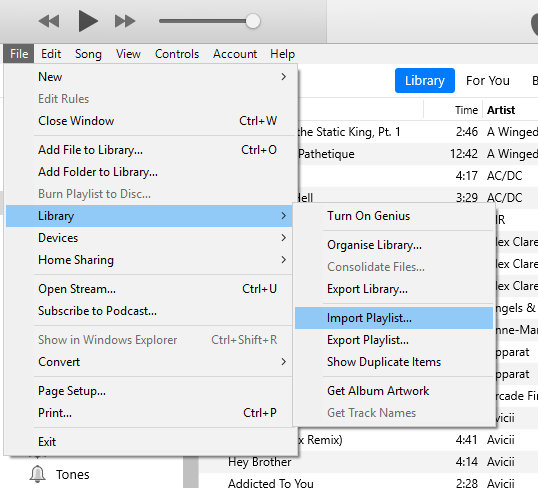
If you copy your playlists to your hard drive, TouchCopy will produce an XML file named after the Playlist you are copying. This XML file contains information about the tracks and track order of the Playlist. To import the playlist into your library, in iTunes/Music, select 'File -> Library->Import Playlist...'. Select the XML file saved by TouchCopy with the same name as the playlist you require and click 'Open'.
Please see our User Guide for further information on how to transfer songs and playlists to iTunes.