TouchCopy should automatically detect your iPhone, iPad, or iPod when it's connected via USB cable. If your device isn't appearing, follow this guide to troubleshoot the issue.
Related pages
Ensure you're using the latest version of TouchCopy for the best performance and latest fixes.
You can check for updates in the app by going to Settings > Updates, or download the latest version below.
Disconnect your device, unlock it with your passcode, and go to the Home screen. Then, reconnect it via USB. Make sure your device stays unlocked and on the Home screen while using TouchCopy.

If prompted, tap Trust on your device to trust your computer.
If you choose not to trust the connected computer, you can charge your device, but the connected computer won't be able to access any content on your device.

Check out our other guide if the trust prompt does not show on your device when TouchCopy is waiting for it.
TouchCopy normally installs the Apple Mobile Device services automatically on Windows. (Macs running macOS Catalina or later don't require additional components.)
If your iPhone isn't detected, these services may be missing or not installed correctly. To fix this, install or reinstall the free Apple Devices app from the Microsoft Store.
Then, open Apple Devices and connect your iPhone (tap Trust if prompted).
If Apple Devices connects to your device, close the app and launch TouchCopy, which should now also connect without issue.

If your device still isn't detected in TouchCopy or Apple Devices, the issue may be with the USB cable or port.
Try a different USB cable and port if available. You can also test the cable with another device to confirm it's working.
Also, make sure you're using a cable that supports data transfer, as some cables are charging-only.
What cable do I need to connect my iPhone to my computer? TouchCopy supports all standard Apple connection cables, including USB-C, Lightning, and even older 30-pin iPod cables. So, whatever cable you usually use to connect your particular device to your computer, it'll be supported by TouchCopy.
The classic IT troubleshooting recommendation - but you'd be amazed how often this resolves lingering issues.
Turn off your iPhone/iPod/iPad as well as your computer. After at least 30 seconds turn them back on. Once they are fully loaded back up, connect your device via USB cable, then launch TouchCopy - are you able to establish the connection now?
Please make sure that TouchCopy has the correct permissions to run as expected. Here's how:
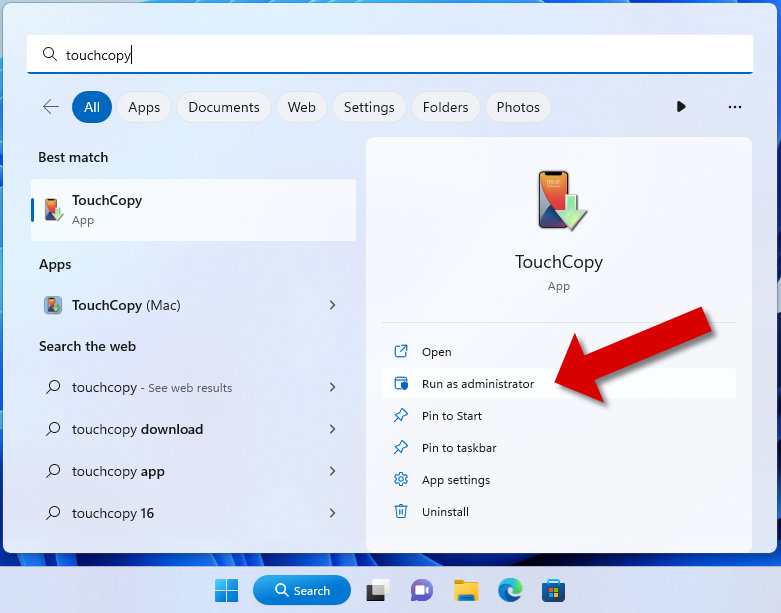
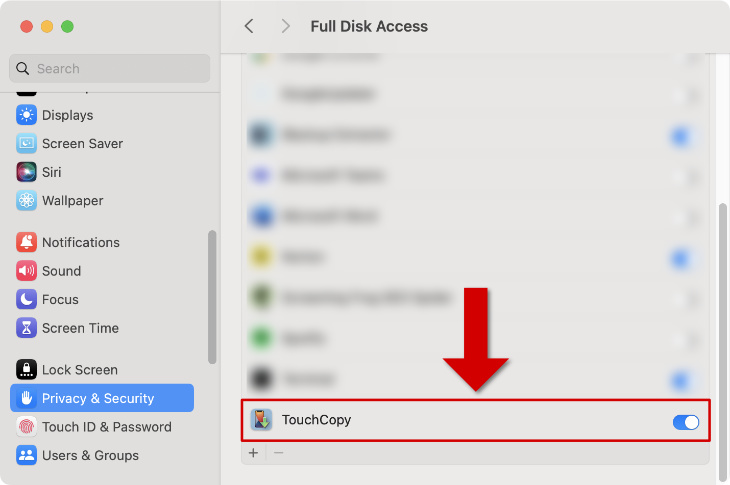
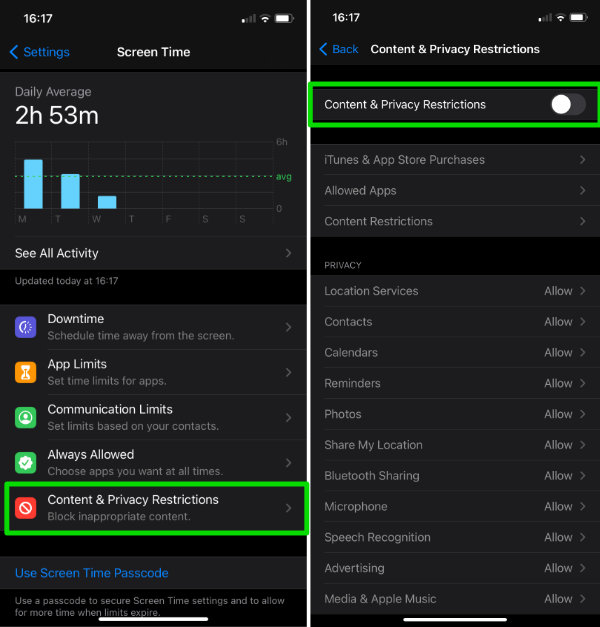
Restrictions set on your iPhone could be blocking communications between it and your computer. To remove these restrictions:
If you continue to have problems with TouchCopy detecting your iPod, iPhone or iPad, please contact our support team.
Optionally, to help our team investigate the issue in detail, please send us TouchCopy's process log. This log may provide info of any processes on your computer that may be blocking TouchCopy from detecting your device.
To email us a log from a Windows computer:
To email us a Console log on a Mac computer: