iBackup Extractor will read the contents of backups made to your local computer only. As such, the software cannot read backups of your device made to iCloud.
If your backups are set to be stored in iCloud, you can change this in your iTunes settings (or in Finder on macOS Catalina or higher).
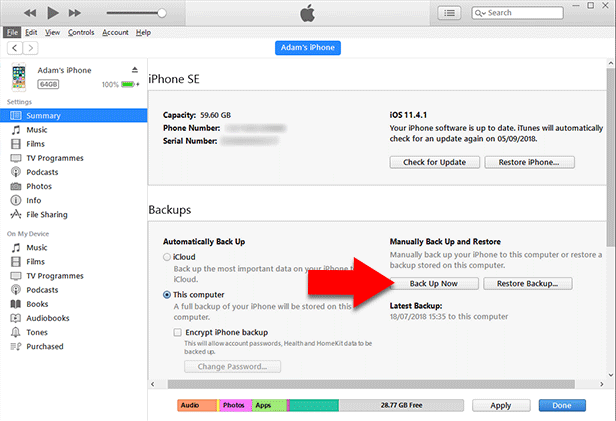
To create a local backup of your device to your Windows PC or Mac running earlier than macOS Catalina:
Open iTunes on your computer.
Connect your iPhone / iPod Touch / iPad.
Click your device icon.
Ensure you are viewing the Summary tab.
Under Backups, make sure "This computer" is selected, then hit "Back up Now".
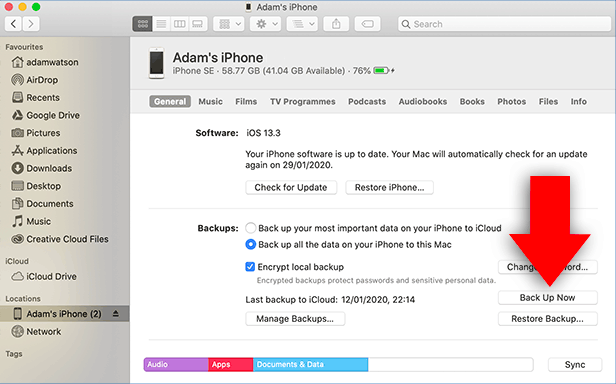
To create a local backup of your device to your Mac running macOS Catalina or higher:
Open Finder on your Mac or MacBook.
Connect your iPhone / iPod Touch / iPad.
Select your device.
Ensure "Back up all the data on your iPhone to this Mac" is selected.
Click 'Back Up Now'.
Now you can launch iBackup Extractor which will find any backup which you have created on your computer!
We use cookies to provide you the best experience on our website. To find out more, read our cookie policy. You may decline non-essential cookies if you prefer.
We use cookies to track usage and optimize your experience.