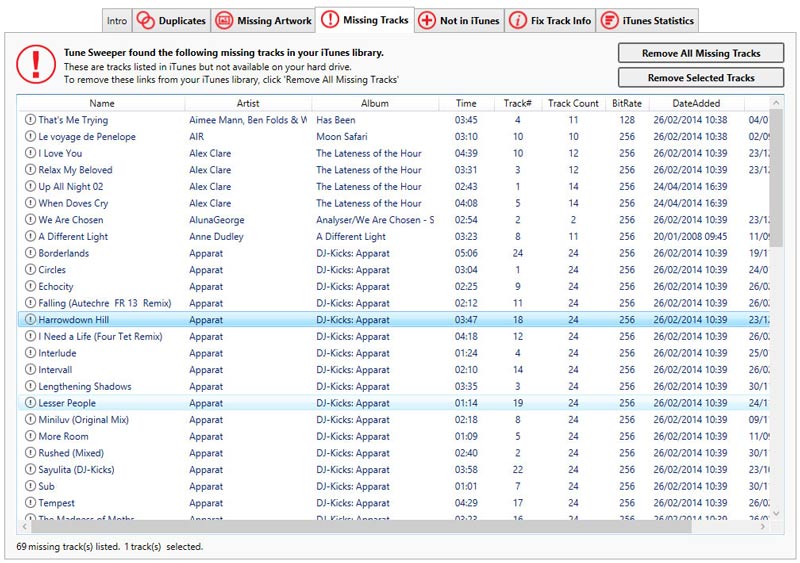
An exclamation mark (!) next to a song in iTunes means iTunes cannot find the file for that track.
When you play one of these tracks, iTunes shows an error because the music file isn't in the location iTunes expects. When a song is added to iTunes, iTunes stores the file path (the folder location of the song on your computer). If the file is moved, deleted, or never copied in the first place, iTunes no longer knows where to find it.
You can use TouchCopy to copy music from your iPhone, iPad or iPod into iTunes.
If your copied tracks are marked with an exclamation mark in iTunes, it means that TouchCopy has added your selected track entries to your library, but was not able to copy the music file itself.
To resolve this, update your iTunes preferences by following the steps below:
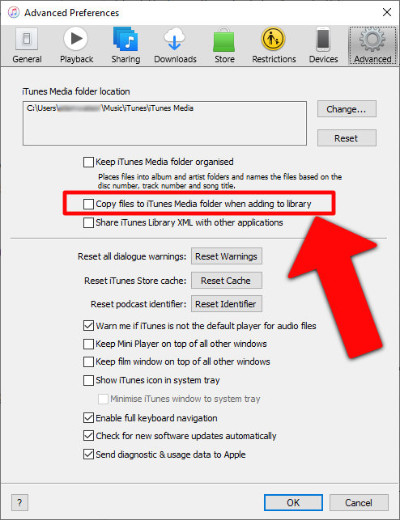
Then, try the transfer again:
TouchCopy will overwrite the old track entries (to prevent duplicates) and copy the music files into your iTunes media folder. The next time you open iTunes, you'll notice that the exclamation marks are gone, and your tracks will play correctly.
If you added the tracks without using TouchCopy, and the songs marked with exclamation points still exist somewhere on your hard drive, you can correct their file paths in iTunes by following the steps below:

Tracks marked with a lock icon instead? If you see a lock icon next to tracks in iTunes, this means that they are DRM-protected. Find out how to play DRM-protected tracks in iTunes.
If you no longer have the music files on your iOS devices or computer hard drive, it's best to remove missing tracks from your iTunes library to keep it organized.
Tune Sweeper can help you clean up your library by removing missing tracks, deleting iTunes duplicates and fixing nameless and incorrectly labeled songs in iTunes.